January 22, 2026
Adjusting a Website for RTL Languages
Supporting RTL Languages in Modern Web Applications
Adjusting an existing website to support RTL (right-to-left) languages may seem complex at first. However, by following a few key rules and best practices, the process becomes much more manageable.As part of our effort to support Middle Eastern languages, proper RTL implementation became a key requirement of our project. Whether you are building a new website or adapting an existing one, the steps below will help ensure proper RTL support and a consistent user experience.
Setting the Document Direction
The first step is defining the global text direction. This is done by adding the dir attribute to the HTML element, ideally on the <html> tag so it applies to the entire page. If necessary, the direction can also be applied to specific elements individually.
The <html> tag should also include the lang attribute to define the document language.
Example for Arabic:
lang="ar"— specifies the languagedir="rtl"— switches the layout from LTR to RTL
How Browsers Handle LTR and RTL Content
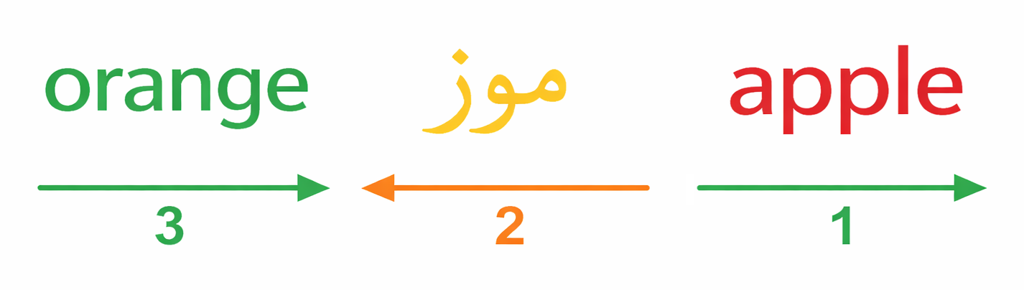
The browser applies the Unicode Bidirectional Algorithm (bidi) to decide how text is visually ordered. This algorithm uses the direction assigned to each Unicode character. For instance, Arabic letters are strongly defined as right-to-left, so a paragraph made up entirely of Arabic characters is displayed from right to left by default.
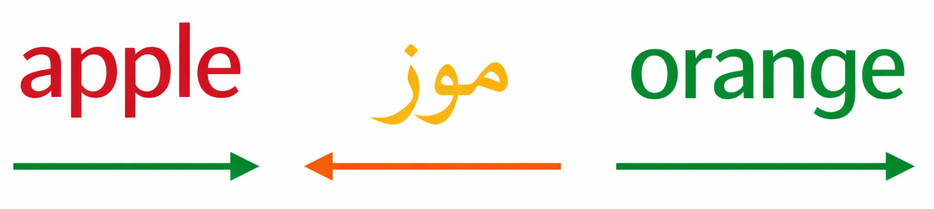
Every English part will be displayed in LTR, and every Arabic part will be displayed in RTL. After changing the direction to RTL the order of parts is reversed.
Using CSS Logical Properties
When supporting both LTR and RTL layouts, direction-specific CSS properties such as margin-left, padding-right, left, and right are often insufficient. Instead, CSS logical properties should be used. These properties automatically adapt based on the document’s writing direction.
Avoid hard-coded left and right values and use logical equivalents where possible.
Commonly used logical properties include:
text-align: start | endjustify-content: flex-start | flex-endalign-content: flex-start | flex-endgrid-column-startgrid-column-endinline-sizefloat: inline-start | inline-endmargin-inline-start | margin-inline-endpadding-inline-start | padding-inline-endborder-inline-start | border-inline-endinset-inline-start | inset-inline-end(instead ofleft/right)
Not every property needs to be converted. In some cases, elements must remain fixed or retain specific spacing regardless of the page direction. These decisions should be made intentionally.
It is also possible to define styles that apply only in RTL mode:
[dir="rtl"] & {
    /* RTL-specific styles */
}
Icons and Visual Direction
Icons often require adjustment when switching between LTR and RTL layouts. Directional elements such as arrows, chevrons, progress indicators, and navigation controls should usually be mirrored to match the reading direction.
Failing to mirror these elements can lead to confusion and reduce usability.

Common Challenges
Some issues are almost inevitable when adapting a website for RTL languages.
One common challenge occurs when testing RTL layouts using an LTR language such as English. Browsers handle LTR and RTL text differently, which can result in visual inconsistencies that only appear once a true RTL language is used. For this reason, testing with an actual RTL language is strongly recommended.
Another frequent challenge involves third-party libraries, including sliders, video players, and dropdown components. Not all libraries fully support RTL layouts. Before integrating any external dependency, it is important to verify RTL compatibility and test the component thoroughly.
Additional Considerations
When implementing RTL support, keep the following points in mind:
- Website logos and primary navigation are typically positioned on the right.
- Scrollbars are browser-controlled and should not be manually adjusted.
- Slider navigation and swipe direction should be mirrored.
- Dates should follow locale-specific formats.
- Dropdown content should be mirrored.
- Numbers are displayed the same as in LTR layouts, but units usually appear on the left.
- Review spacing, margins, and paddings carefully.
- Test in an RTL language as early as possible.
- Ensure all external libraries provide proper RTL support.
Conclusion
Supporting RTL languages is an important step toward building inclusive, globally accessible websites. Proper RTL implementation improves usability by aligning the interface with how native users read and navigate content. It also enables businesses to reach broader audiences and reinforces a professional, high-quality user experience.
With the right foundations in place, RTL support becomes a maintainable and valuable part of any modern web platform.

Vast experience help us achieving quality and speed. We combined knowledge and different methodologies to create most efficient way of working.
Menu
©copyright coffee mug 2026